IPHONE · WEBAPP
On iPhone? Fitoli is for you, too.
Add Fitoli to your Home Screen. Open it from its own icon as a web app.
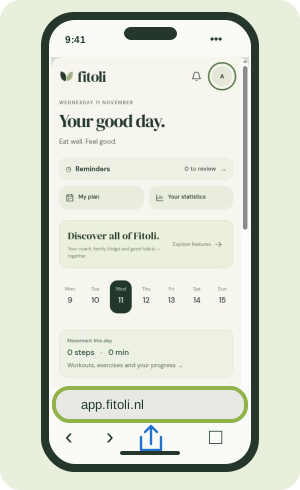 01
Open Safari
Go to app.fitoli.nl — the app’s address.
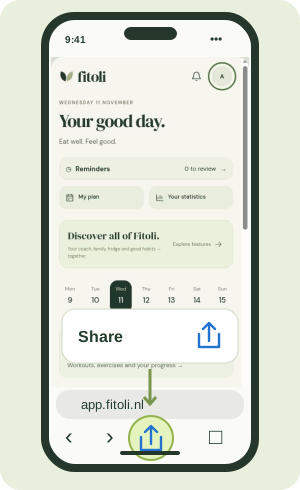 02
Tap Share
Look for the square with an upward arrow. In some layouts, open the page menu “…” first.
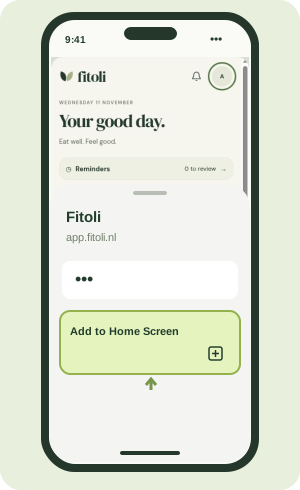 03
Add to Home Screen
Scroll through the actions and choose Add to Home Screen.
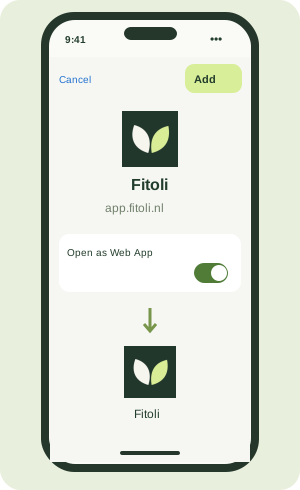 04
Add and open
Turn on Open as Web App if shown, then tap Add. Open Fitoli from your new Home Screen icon.
Instructional illustrations using a Fitoli screen. Layout and labels may vary with your iOS version and phone language.
Missing the option? Scroll to the bottom of the share menu, tap Edit Actions and add Add to Home Screen. If the link opened inside Instagram or Facebook, copy app.fitoli.nl and open it in Safari.
This is a web app; no APK download is needed. Use your existing Fitoli account. An internet connection is required.