Food, your way.
Log meals, explore recipes and plan your week.
ANDROID · WEB APP
You do not need an APK for the web app. Use Chrome on your Android phone.
Open app.fitoli.nl in Chrome. Coming from Instagram or Facebook? Choose Open in browser or copy the address into Chrome first.
Open Chrome’s ⋮ menu beside the address bar. Choose Install and create shortcut → Install. Some versions call this Install app or Add to home screen.
Confirm installation. Find Fitoli in your app list or on your home screen and sign in to the same Fitoli account.
That adds a website shortcut. Update Chrome and open Fitoli directly in Chrome, outside Instagram or Facebook.
The web app uses the latest web version. Sign-in, sync and AI need an internet connection.
The APK below is a separate Android version. Choose the version you want to test.
ANDROID BETA · TESTERS WELCOME
Meet Fitoli: food, movement and Buddy, together in one app. Try the beta in your daily life and help us make it better.
Download Android betaAndroid 9 or newer · Internet connection · Up-to-date Chrome recommended
Try it in your browser ↗On iPhone? How to installLog meals, explore recipes and plan your week.
Get ideas and support for your everyday habits.
Explore exercises, make a plan and record your workouts.
APK BETA
Open this page on your Android phone and download the APK.
Open the downloaded file. If Android asks, allow installation from this browser. You can turn that permission off afterwards. Keep Play Protect enabled; if it blocks the file, stop and use the web app.
Open Fitoli and create an account or sign in. Log a meal, explore recipes and try Buddy.
IPHONE · WEBAPP
Add Fitoli to your Home Screen. Open it from its own icon as a web app.
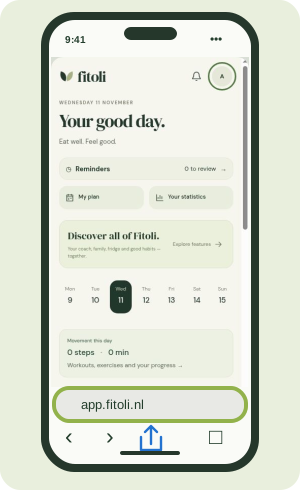 01
Go to app.fitoli.nl — the app’s address.
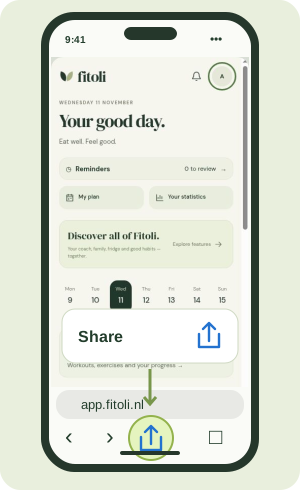 02
Look for the square with an upward arrow. In some layouts, open the page menu “…” first.
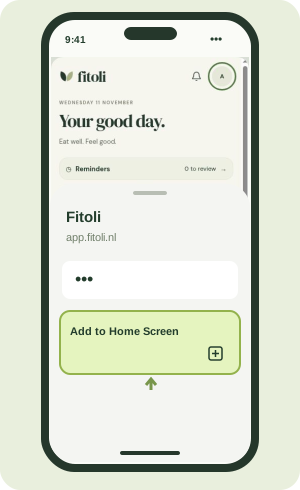 03
Scroll through the actions and choose Add to Home Screen.
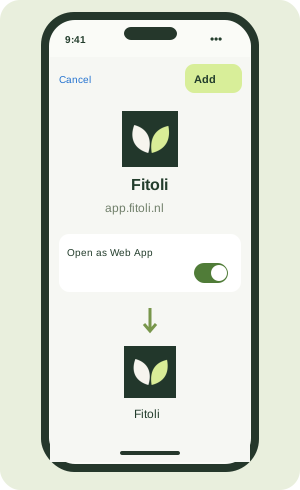 04
Turn on Open as Web App if shown, then tap Add. Open Fitoli from your new Home Screen icon.
Instructional illustrations using a Fitoli screen. Layout and labels may vary with your iOS version and phone language.
Missing the option? Scroll to the bottom of the share menu, tap Edit Actions and add Add to Home Screen. If the link opened inside Instagram or Facebook, copy app.fitoli.nl and open it in Safari.
This is a web app; no APK download is needed. Use your existing Fitoli account. An internet connection is required.
02 / FEEDBACK
What felt easy? What got in the way? Email fitoliapp@gmail.com or use in-app feedback.
For a bug, include your phone model, Android version, what you tried and what happened. Remove personal or health information from screenshots.No. This is a direct APK download from Fitoli for voluntary beta testing.
Most Fitoli updates arrive through the web app. If the Android installer changes, you will need to download and install a new APK. This download does not provide automatic APK updates.
Sign in with the same account. If Android reports a signature conflict, do not uninstall to force the update; use the web app and contact us.
The APK is for Android only. Use the browser version on your other devices.
Yes. This is a test build, and features may change. Use the app’s export option to keep a copy of important entries. AI estimates should be checked before you save them.
Compare SHA-256 with the value above. Check the signing certificate with apksigner from the Android SDK. Do not install if they differ. If signatures conflict, do not uninstall your existing app: you may lose local data. Use the web app instead. The APK remains 0.2-beta (build 2); this package updates the web app, website and control center. APK updates do not install automatically.
Windows PowerShell:
Get-FileHash .\Fitoli-Android-0.2-beta.apk -Algorithm SHA256
macOS:
shasum -a 256 Fitoli-Android-0.2-beta.apk
Linux:
sha256sum Fitoli-Android-0.2-beta.apk
Android SDK:
apksigner verify --verbose --print-certs Fitoli-Android-0.2-beta.apk
Certificate SHA-256:
14f5660be8731babe19cc753c30d02b87c187fc4c9d1c8f836792d8bedb245d2iPhone: Safari and iOS 16.4 or later recommended. Web push requires iOS 16.4+ and installation on the Home Screen. Older versions are outside current support. Export: Profile → Download your data (JSON) or Export diary CSV. Contact us for a complete data copy.